cPanel/WHM The system cannot determine the base domain
WHM error: The system cannot determine the base domain (domain name)
Solution : run /scripts/upcp –force
WHM error: The system cannot determine the base domain (domain name)
Solution : run /scripts/upcp –force
Simple hot link protection using .htaccess
<IfModule mod_rewrite.c>
 RewriteEngine on
 #RewriteCond %{HTTP_REFERER} !^$
 RewriteCond %{REQUEST_FILENAME} -f
 RewriteCond %{REQUEST_FILENAME} \.(gif|jpe?g?|png)$ [NC]
 RewriteCond %{HTTP_REFERER} !^https?://([^.]+\.)?your-domain\. [NC]
 RewriteCond %{HTTP_REFERER} !^https?://([^.]+\.)?google\. [NC]
 RewriteRule \.(gif|jpe?g?|png|bmp)$ http://your-domain/hotlinkdenied [R,L]
</ifModule>
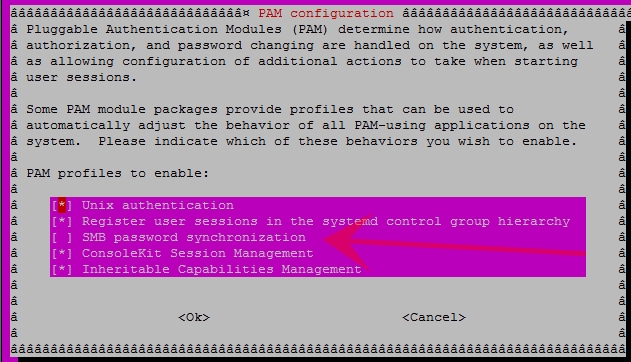
sudo apt-get remove libpam-smbpass
or
pam-auth-update
and remove “SMB password synchronization”
Recently after a backup restore MySql server failed to start with the following error message:
start: Job failed to start
To fix start: Job failed to start I had to re-install the MySQL server.
I hope you have a backup of your data because you will lose all your MySQL data running the following commands
apt-get remove --purge mysql-server
rm -rf /var/lib/mysql
apt-get auoremove
apt-get get update
apt-get install mysql-serverAfter boot there was no console prompt to login.
The issue was related to the VGA resolution.
modify in /etc/default/grub
# Grub Resolution
GRUB_GFXMODE=1024x768x24

# Kernel param to set a port to resolution and vertical refresh.
GRUB_CMDLINE_LINUX_DEFAULT="nomodeset video=VGA:M1024x768@60m"
Of course, you can set resolution to suit your needs by replacing 1024x768x24 to whatever you need.
There are several solution on how to check if php5-fpm is running but they all failed (link1, link2).
The solution to check if php-fpm is running is to use wget to get a file in your server. If wget fails then restart the service.
WordPress contributor role lacks the permission to upload images.
There are a few plugins that can let you change role permissions, but I just needed to allow contributor role to upload images.
if ( current_user_can('contributor') && !current_user_can('upload_files') )
	add_action('admin_init', 'wif_allow_contributor_uploads');

function wif_allow_contributor_uploads() {
	$contributor = get_role('contributor');
	$contributor->add_cap('upload_files');
}
SELECT COLUMN_NAME FROM INFORMATION_SCHEMA.COLUMNS WHERE TABLE_SCHEMA = 'database_name' AND TABLE_NAME = 'table_name';
where
If you have not pushed a commit use the following command to delete last commit.
git reset --soft HEAD~1
$.validator.addMethod("checkEmailAvailability",function(value,element){
	var result;
	$.ajax({
        type: "POST",
        async: false,
		url:"includes/ajax/check-availability.php",
		data:{email:value},
		dataType:"json",
        success: function(response) {
			result=response.success;
			$.validator.messages.checkEmailAvailability=response.msg;
         }
     });
	 return result;
});
In the above code the message for the validator method is set by using
$.validator.messages.checkEmailAvailability=response.msg;
where the response.msg is the message we receive from the server.
If you find this useful leave us a comment.